Loki Agent for AIX Documentation
This Loki agent for AIX documentation covers installation, configuration, and usage of the native AIX log shipping daemon for IBM Power Systems. It applies to AIX 7.1, 7.2, and 7.3. Under the hood, the agent reads errpt directly from /dev/errlog and streams structured entries to Grafana Loki in real time — no syslog configuration required, and zero external dependencies.
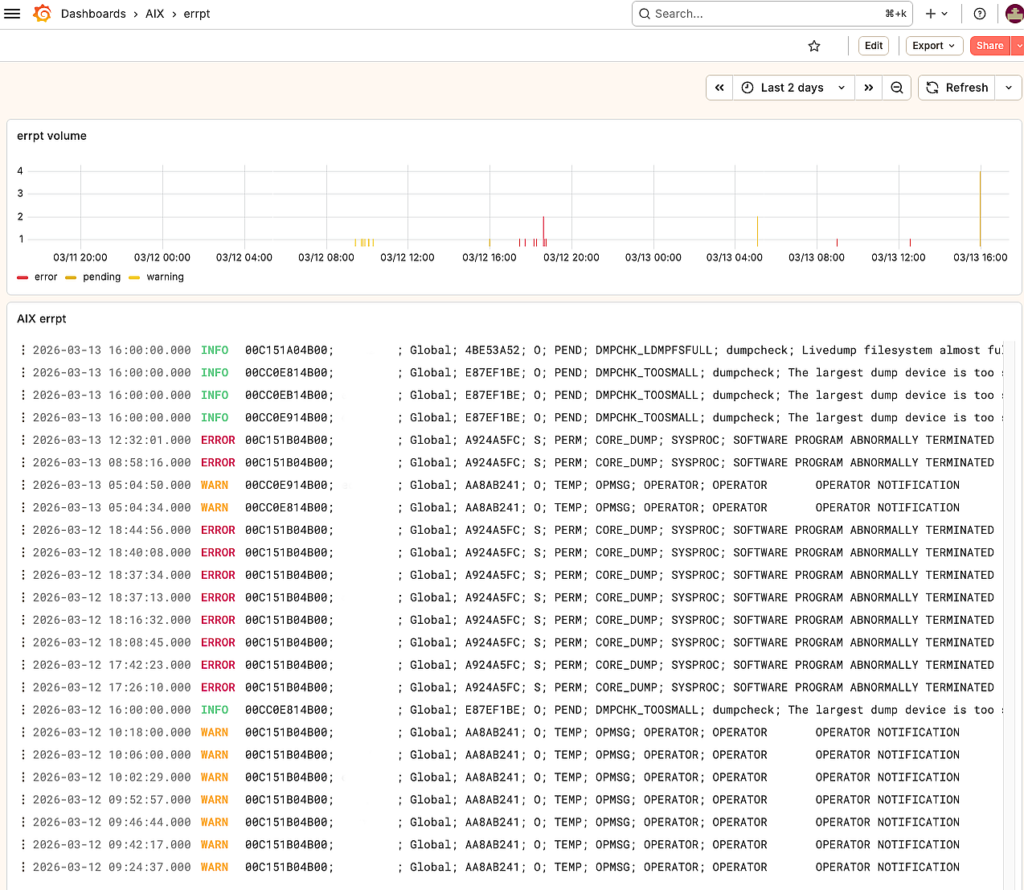
Loki Agent for AIX Documentation — Requirements
- AIX 7.1, 7.2, or 7.3 on IBM Power Systems
- Root access (for errlog access)
- Furthermore, network access from the agent to Loki push endpoint (default: port 3100)
- Moreover, for TLS builds: AIX base OpenSSL 3 (libssl.a, libcrypto.a)
Loki Agent for AIX Documentation — Installation
First, download the appropriate package. The Loki agent for AIX documentation is distributed as a standard AIX BFF package in 4 variants:
| Package | TLS | License |
|---|---|---|
| loki-agent | No | Full |
| loki-agent-tls | Yes | Full |
| loki-agent-trial | No | 30-day trial |
| loki-agent-tls-trial | Yes | 30-day trial |
Install
To install, run one of the following commands depending on whether you need TLS support. In addition, use the trial variant first if you want to evaluate before purchasing.
# Standard (no TLS)
installp -aXd loki-agent-1.0.0.1.bff loki-agent

# With TLS support
installp -aXd loki-agent-tls-1.0.0.1.bff loki-agent

# Verify
lslpp -l loki-agent.rte
Specifically, the installer automatically:
- Copies the binary to
/usr/local/bin/loki-agent - Creates config directory
/etc/loki/ - Installs default config
/etc/loki/loki-agent.conf - Registers an SRC subsystem
- In addition, it adds an inittab entry for auto-start at boot
- Finally, it installs EULA, README, and CHANGELOG to
/usr/local/share/loki-agent/
Uninstall
To remove the package, first stop the agent, then uninstall:
stopsrc -s loki-agent
installp -u loki-agent.rte
Configuration
Next, edit /etc/loki/loki-agent.conf to configure your Loki endpoint:
# Loki push endpoint
loki_url = http://loki-server:3100/loki/api/v1/push

# Hostname label (default: system hostname)
# hostname = my-aix-server

# Job label
job = aix-errpt

# Poll interval in seconds (default: 10)
poll_interval = 10

# TLS settings (TLS build only)
# tls_ca_cert = /etc/loki/ca.pem
# tls_skip_verify = 0
Running
Once installed and configured, start the agent using IBM SRC. However, ensure first that the loki_url in /etc/loki/loki-agent.conf is reachable before starting.
# Start
startsrc -s loki-agent

# Stop
stopsrc -s loki-agent

# Status
lssrc -s loki-agent
Log Labels from the Loki Agent for AIX
In addition, each log entry pushed to Loki includes the following structured labels, which allow filtering in Grafana:
| Label | Description | Example |
|---|---|---|
hostname | System hostname | aix-prod-01 |
job | Job name | aix-errpt |
errpt_class | Error class | H (hardware), S (software), O (operator) |
errpt_type | Error type | PERM, TEMP, PERF, INFO, UNKN |
errpt_resource | Resource name | hdisk0, ent0, SRC |
In addition to the structured labels, the agent preserves the full errpt message as the log line body, which makes full-text search in Grafana Explore straightforward.
Grafana Loki Queries for the Loki Agent for AIX
For example, here are useful LogQL queries for Grafana Explore. Moreover, you can combine multiple label filters to narrow down the results to a specific host, error class, or resource.
# All errors from a specific host
{hostname="aix-prod-01", job="aix-errpt"}

# Hardware errors only
{job="aix-errpt", errpt_class="H"}

# Permanent errors across all hosts
{job="aix-errpt", errpt_type="PERM"}

# Disk-related errors
{job="aix-errpt", errpt_resource=~"hdisk.*"}

# Count errors per host in last 24h
count_over_time({job="aix-errpt"}[24h]) by (hostname)
Dependencies
| Build | Dependencies |
|---|---|
| Standard | None (AIX base only) |
| TLS | libssl.a, libcrypto.a (AIX base OpenSSL 3) |
Troubleshooting
Connection refused to Loki
- First, verify the
loki_urlin config - Also, check firewall rules (default port 3100)
- Test with:
curl -s http://loki-server:3100/ready
Therefore, always verify connectivity before investigating the agent configuration.
No logs appearing in Grafana
- First, verify the agent is running:
lssrc -s loki-agent - Then, check if there are recent errpt entries:
errpt | head - Also, ensure the Loki datasource is configured in Grafana
Consequently, if logs are still missing, check the Loki ingester logs on the server side.
TLS certificate errors
In that case, set tls_ca_cert to your CA bundle, or temporarily set tls_skip_verify = 1 for testing.
Compatibility
Finally, the Loki agent for AIX is tested and supported on AIX 7.1 TL5 and above, AIX 7.2 (all TLs), and AIX 7.3 (all TLs). Runs on IBM POWER7 through POWER11, both 32-bit and 64-bit kernel modes. Compatible with Grafana Loki 2.x and above. The agent pairs naturally with the AIX-exporter to provide complete observability — correlate errpt hardware errors in Loki with disk I/O spikes in Prometheus.
Questions? Contact support